Asus
🚚 Get it in 1-2 days or Same-Day delivery
Couldn't load pickup availability

Model: PG32UCDM
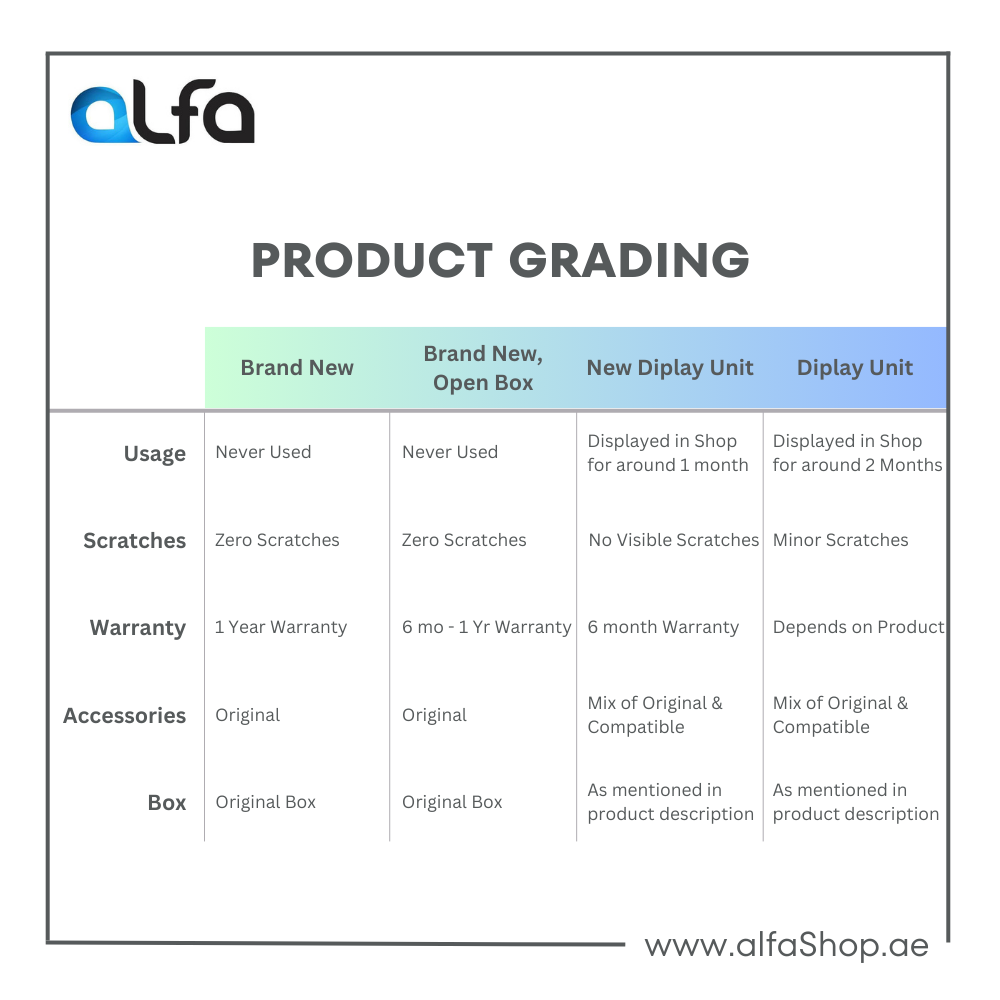
Category: Brand New, Open Box
Power Cable: Yes
Box: Yes
Returns: 10 days money back guarantee
Screen Size: 31.5 inches
Panel Type: OLED
Resolution: 4K UHD (3840 x 2160)
Refresh Rate: 240Hz
Response Time: 0.03ms (GtG)
HDR: DisplayHDR True Black 400
Key Features: NVIDIA G-SYNC Compatible, AMD FreeSync Premium Pro, Custom Heatsink, ROG Smart KVM
4K Resolution: At 31.5 inches, the pixel density is superb, resulting in incredibly sharp and detailed images. It's perfect for immersive single-player games and provides a clear desktop experience for productivity.
OLED Panel: This is the heart of the experience. OLED technology offers perfect per-pixel lighting, meaning infinite contrast ratios, true blacks, and no blooming or haloing. Colors are vibrant and incredibly accurate.
240Hz Refresh Rate: This ensures buttery-smooth motion clarity, which is crucial for competitive gaming. The combination of 4K and 240Hz is the current pinnacle for high-performance gaming.
Infinite Contrast & Perfect Blacks: As an OLED, pixels turn off completely to display black. This creates a level of depth and realism that LCD-based monitors (even high-end Mini-LEDs) cannot match.
DisplayHDR True Black 400: This is the specific HDR certification for OLEDs. While the peak brightness number (around 1000 nits for small highlights) may seem lower than some Mini-LED monitors, the perceived contrast and HDR impact are often superior because the blacks are truly black. Highlights in dark scenes, like explosions or headlights, pop with incredible intensity.
Color Gamut: It covers 99% of the DCI-P3 color space, making it excellent for content consumption, photo editing, and video work.
0.03ms Response Time: This is effectively instantaneous. There is virtually no ghosting or smearing in fast-paced games. The motion clarity is unmatched by any IPS or VA panel.
240Hz Refresh Rate: Paired with the near-instant response time, fast-paced action in shooters, racing games, and MOBAs looks incredibly fluid and sharp.
G-SYNC & FreeSync: It's certified as G-SYNC Compatible and supports AMD FreeSync Premium Pro, ensuring a smooth, tear-free gaming experience whether you use an NVIDIA or AMD graphics card.
Custom Heatsink: To manage heat and prevent potential OLED burn-in, ASUS uses a custom-designed internal heatsink. This allows for higher sustained brightness and is a key part of their durability engineering.
Burn-in Mitigation: Includes standard OLED protection features like pixel shifting, a pixel refresher, and a screensaver.
ROG Smart KVM: A highly useful feature for users with multiple devices (e.g., a gaming PC and a work laptop). You can control both with a single keyboard and mouse, and the monitor will automatically switch the KVM when it detects which input is active.
Connectivity: Includes two HDMI 2.1 ports (enabling 4K 120Hz on consoles like the PS5), a DisplayPort 1.4, a USB-C port with 90W Power Delivery, and a USB hub.




Discover the latest Apple iPads at AlfaShop UAE and experience the perfect...

Are you ready to embark on an epic gaming adventure? Look no...

An air conditioner (AC) is an electrical appliance designed to regulate indoor...

When buying a refrigerator, choosing the right store is just as important...

Cooking range is an essential appliance for any kitchen, and we understand...

Welcome to our website, where you can find a perfect dish washer...

Are you looking to beat the heat without breaking the bank on...

Electric scooters are innovative personal transportation devices that offer a convenient and...


